
How to Make a Minecraft Skin With AI
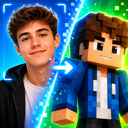
AI is the fastest way to get a custom Minecraft skin in 2026. Type a description or upload a photo and, seconds later, you've got a blocky character — no pixel-art skills required. But there's a catch that trips up almost everyone who tries it: the AI most people reach for first, ChatGPT, hands you a beautiful picture that Minecraft won't accept as a skin. It looks perfect on screen, you download it, and then it either won't upload at all or wraps onto your character like a photo stretched over a box.
The fix isn't to give up on AI — it's to understand the one distinction that decides whether you get a wearable skin or just art. This guide covers what "making a skin with AI" actually means, why general chatbots produce pictures instead of skins, how to tell the two apart in seconds, and how to get a real, playable AI skin onto Java or Bedrock.
How to make a Minecraft skin with AI (the short version)
If you just want the quick path, here it is. The rest of the guide explains each step so you can judge any AI tool for yourself.
- Decide your input: a clear photo of yourself, or a text description of the character you want.
- Use an AI tool built for skins that outputs a real 64×64 PNG on the skin template — not a general image generator that outputs a picture.
- Preview the result on the 3D model, then download the
.png. - Upload it to your account: at minecraft.net for Java, or via Import in the in-game character creator for Bedrock.
Why AI is the easiest way to make a skin now
Making a skin by hand means drawing a 64×64 pixel character across a fiddly, folded-out template — hours of work, and a real learning curve before it looks like anything. AI collapses that. You give it your intent (a photo, or a sentence like "a girl with pink braids in a green hoodie") and it paints the whole character for you in seconds.
So the hard part isn't getting AI to make something Minecrafty — that's easy now. The only question that actually matters is whether your AI hands you a wearable skin file or just an image of a character. Get that distinction right and everything else is quick.
Can ChatGPT make a Minecraft skin?
Short answer: ChatGPT can draw you a great-looking picture of a Minecraft character, but not a skin file you can upload and wear. The same is true of the other general image AIs — DALL·E (the engine behind ChatGPT's images), Google Gemini, and Midjourney all return an image of a character. And text-first assistants like Claude don't generate raster images at all; ask for a skin and you'll get a description or some code, not a PNG.
This isn't a knock on those tools — they're superb image generators. It's just that a skin isn't an image in the ordinary sense, and here's the mechanic that explains the gap:
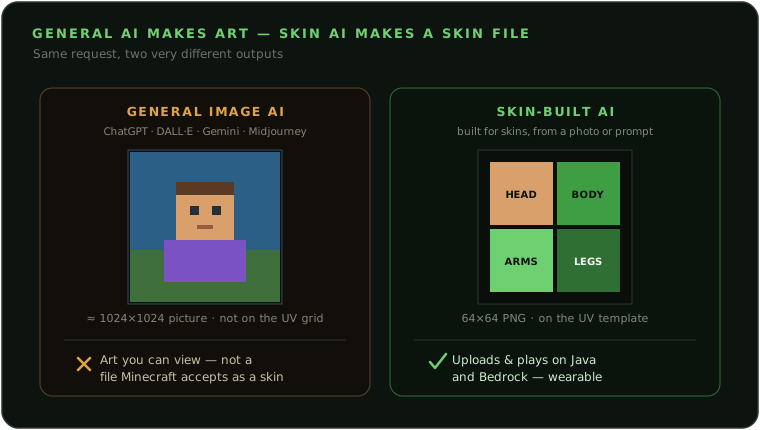
- They paint onto a big blank canvas. General image models output large pictures, commonly around 1024×1024. A Minecraft skin is a tiny, exact 64×64 — different world entirely.
- They don't know the UV template. A skin is a texture map: a fixed layout of which little rectangle paints which face of which cube (head-front here, right-leg there). A general model has no concept of that grid, so even a flawless-looking result is a portrait or a scene, not pixels mapped to the model's faces.
- So the output is art, not a wearable file. You can admire it, set it as a wallpaper, or post it — but if you try to use it as a skin, Minecraft rejects it. Force it down to 64×64 and it wraps as a smeared mess, because the pixels were never on the UV grid to begin with.
Can you get around it by asking for "a 64×64 Minecraft skin texture"? You can ask, and the model will try — but general image AIs don't reliably emit pixel-accurate 64×64 textures aligned to the exact UV layout, so it's a gamble and usually still comes back as art. The dependable route is different: use AI that was built to output the skin file itself.
The two kinds of "AI skin generator"
When a site advertises an "AI Minecraft skin generator," it's usually one of a few different things. They differ on the one point that matters — do you walk away with a wearable file? Here's an honest, side-by-side look.
| Type of AI tool | Real 64×64 skin file? | Plays in Java/Bedrock? | How it looks | Best for |
|---|---|---|---|---|
| General image AI (e.g. ChatGPT / DALL·E, Gemini, Midjourney). You prompt it and it paints a picture. |
No — the output is a rendered image, not a UV-mapped skin. | Not as-is; a picture isn't a file you can wear. | Often gorgeous artwork — but it's art, not a skin. | Wallpapers, concept art, thumbnails. |
| Text-prompt skin generators Type a description and get a pixel skin back. |
Usually yes — a real 64×64 PNG. | Yes, a standard skin file. | Quality varies a lot; can be generic or drift off your brief, and it won't look like a specific person. | Quick themed skins from an idea. |
| Photo pixel-mappers Upload a photo and it stamps the pixels straight onto the template. |
Yes — typically a real 64×64 PNG. | Yes, genuinely uploadable. | Your flat photo shrink-wrapped onto a blocky body — stretched and distorted, not redrawn. | A literal (if crude) photo wrap. |
| Photo2Skin (AI photo → real playable skin) Upload a photo or type a prompt; it redraws you as a character. |
Yes — a genuine 64×64 PNG on the correct UV layout, plus 3 style variants. | Yes, built for both, with a 3D preview to check the wrap first. | AI-quality likeness redrawn as a proper blocky character, correctly mapped. | A recognizable, playable you. |
Two gaps show up again and again. The first is great-looking output that isn't a usable file — polished AI art you can't actually wear. The second is the opposite: a real, uploadable file that looks crude, because a photo was shrink-wrapped onto a box instead of redrawn.
The sweet spot is the intersection: AI-quality results and a genuine, correctly-mapped 64×64 PNG. That's the gap a skin-built AI is designed to fill, and it's exactly where Photo2Skin aims to land.
How to check any AI skin is the real thing
You don't have to take a tool's word for it. Run this quick check on anything calling itself an AI skin generator. A real skin is:
- A PNG file, not a JPG — only PNG can store the empty pixels a skin's overlay layer needs.
- 64×64 pixels. (Java also accepts legacy 64×32; Bedrock accepts 64×64 or 128×128.) Not a 512×512 or 1024×1024 image.
- Uploadable to your account. The tool tells you how to put it on your character — upload at minecraft.net for Java, or Import in-game for Bedrock.
- Laid out on the skin template. You can recognize a face patch and a torso patch in the flat sheet, not a full-scene picture.
- Model-aware. It lets you choose, or clearly states, Classic (4px arms) vs Slim (3px arms).
And the red flags that you're getting a picture, not a playable skin: the output is a large image (512×512, 1024×1024) or a JPG; it's described as "art," an "avatar," or an "image" with 64×64 never mentioned; there are no upload instructions, just "download your image"; or Minecraft simply won't accept the file. For a deeper walk-through of what makes a valid skin, see our guide on turning a photo into a Minecraft skin.
The easy way: make your AI skin with Photo2Skin
If you'd rather skip the trial-and-error and just get a real, playable skin, this is the shortcut. Photo2Skin uses AI to do one thing well: turn a photo or a text prompt into a genuine Minecraft skin file.
- Start from a photo or a prompt. Upload a clear, front-facing photo for a likeness of you, or describe the character you want in text — the AI redraws either into a blocky character.
- Get three AI styles back. From one input you get three distinct variants (Signature, Cute, and Playful), so you're picking a look you like rather than accepting a single output.
- Preview it in 3D. Spin the skin on the model to see exactly how your face, hair, and clothes sit on the character before you commit.
- Edit it if you want. Open your skin in the built-in Minecraft skin editor to tweak colors, fix details, or add a logo — painting in 2D or straight on the 3D model.
- Download the 64×64 PNG. The file you get is a real, correctly-mapped skin, ready to upload to Java or Bedrock.
It runs in any browser, and there's an iOS app if you'd rather make your skin on your phone and apply it right there.
How to upload your AI skin (Java and Bedrock)
Once you have a real 64×64 PNG, applying it takes about a minute. A few things are true either way: the file must be a PNG at 64×64 (Bedrock also accepts 128×128), and you need to be signed in with your Microsoft account.
- Java (PC/Mac): go to minecraft.net, sign in, open the Skins page (or the Skins tab in the Minecraft Launcher), pick Classic or Slim, select your
.png, and upload. Restart the game to see it. - Bedrock (Windows, mobile, console): open the Dressing Room → Edit Character → Classic Skins, choose Import, pick your
.png, and confirm your body type. Consoles can't import a custom PNG directly — do it on a PC, phone, or tablet.
Want the full click-by-click version with screenshots? It's in our photo-to-skin guide.
Frequently asked questions
Can ChatGPT make a Minecraft skin?
ChatGPT can draw you a great-looking picture of a Minecraft-style character, but not a skin file you can upload and wear. Its image engine paints onto a large canvas (around 1024×1024) with no concept of Minecraft's UV template, so what you get is artwork, not a 64×64 texture laid out for the game. To wear it in-game you need a tool built to output the skin file itself.
Can Claude or Gemini make a Minecraft skin?
It's the same story, split two ways. Gemini and Midjourney are image generators, so they return a picture of a character rather than a UV-mapped 64×64 skin file. Claude and most text-first assistants don't generate raster images at all — they'll describe a skin or hand you code. Either way you don't end up with a PNG you can upload as a skin. That takes AI built specifically for skins.
Is there an AI that makes real, playable Minecraft skins?
Yes. Purpose-built photo-to-skin and text-to-skin tools use AI to redraw you (or your idea) as a proper blocky character and export a genuine 64×64 PNG on the correct UV layout — the exact file Minecraft accepts. Photo2Skin is one example: upload a photo or type a description and download a real skin that uploads to Java and Bedrock.
Why won't my AI-generated skin upload to Minecraft?
Almost always because it's an image, not a skin file. General image AIs output a large picture (often 1024×1024) or a JPG, and Minecraft only accepts a 64×64 PNG (Bedrock also allows 128×128) laid out on the skin template. If you force such an image down to 64×64 it wraps as a smeared mess, because the pixels were never mapped to the model's faces. Use a tool that exports a real skin file and this problem disappears.
Can AI make a Minecraft skin from a photo?
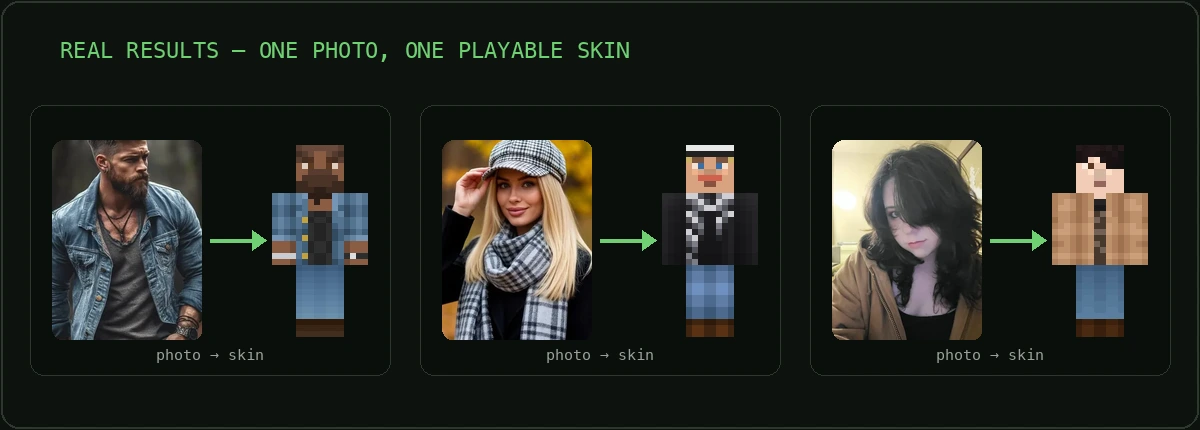
Yes, and it's the most popular way to get a skin that looks like you. A photo-to-skin AI reads your face, hair, and outfit and repaints them as a blocky character on the 64×64 template, rather than stamping your flat photo onto a box (which looks stretched). Use a clear, front-facing, well-lit photo for the best likeness.
Is it free to make a Minecraft skin with AI?
It varies by tool. Some AI skin generators include a few free generations, others are paid. What matters more than price is whether you can actually download a usable 64×64 PNG at the end — not just preview a picture. Check that before you spend time on any tool.
Do AI Minecraft skins work on both Java and Bedrock?
A real AI-made skin does, because a valid skin is a single 64×64 PNG that both editions accept — only the upload differs. For Java you upload the PNG at minecraft.net or in the launcher; for Bedrock you tap "Import" in the in-game Dressing Room. A picture from a general image AI works in neither until it's turned into a proper skin file.
Are AI-made skins against Minecraft's rules?
No. A custom skin is just a 64×64 PNG you upload to your own account, and it makes no difference to the game whether a person or an AI painted those pixels. Use content you have the rights to (for a photo skin, that's your own photo), and you're playing by the same rules as any custom skin.
Making a Minecraft skin with AI, the right way
AI really is the fastest way to make a Minecraft skin today — the trick is choosing AI that outputs a real skin, not just an image. General image tools like ChatGPT are brilliant at pictures, but a skin is a 64×64 PNG on the UV template that uploads to your account and plays in Java or Bedrock. Pick a tool built to produce that file and you get the best of both: AI-quality results and a skin you can actually wear. When you're ready, you can make your AI Minecraft skin in a couple of minutes and be playing as it the same day.