
How to Make a Minecraft Dungeons 2 Skin of Yourself
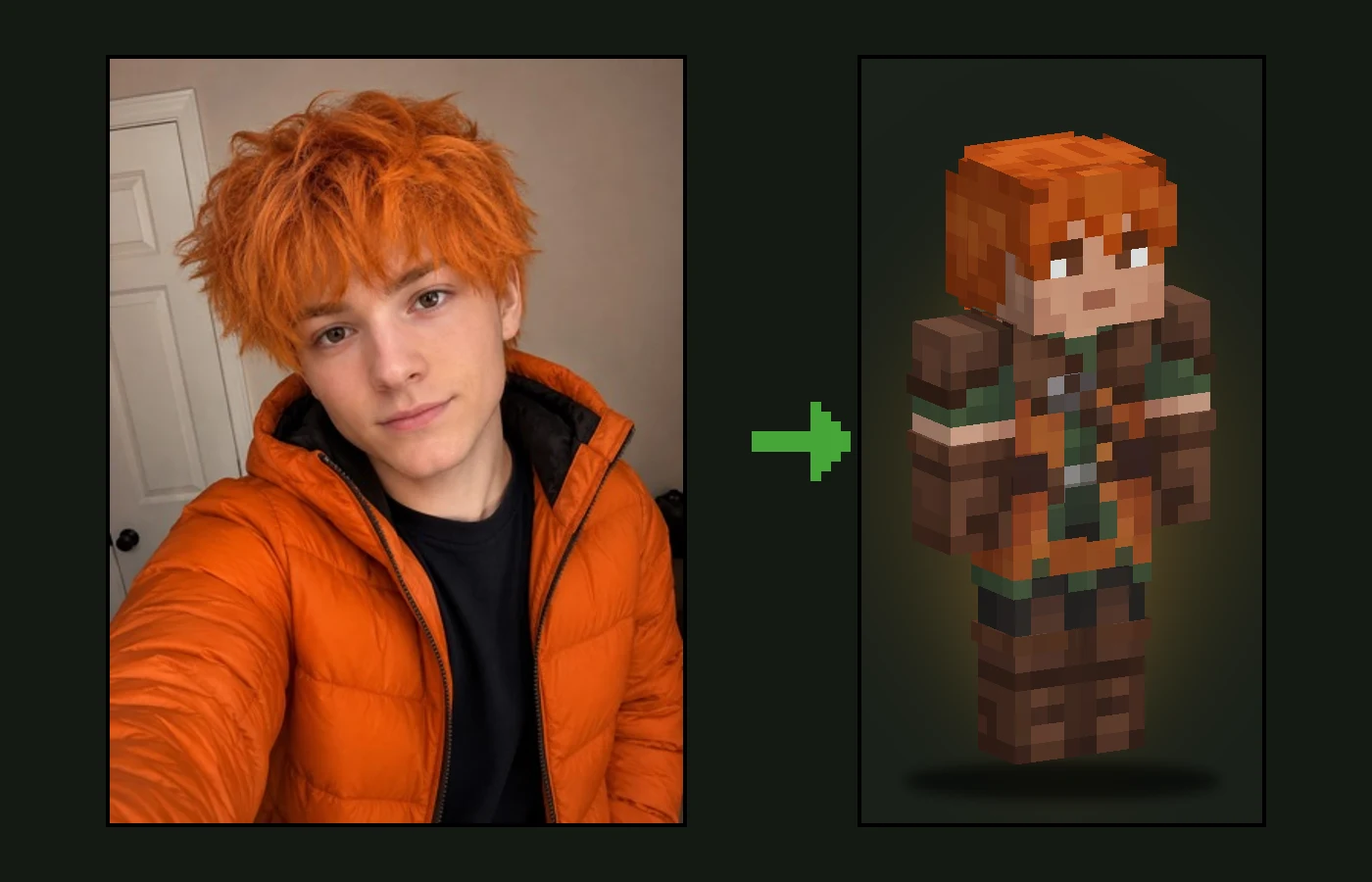
Minecraft Dungeons II's release date is September 29, 2026, and it arrives with a new cast of heroes in layered tunics, bold collars and battle-worn leather. The game has its own heroes, but in regular Minecraft you can be one yourself: turn a photo into a Minecraft skin that keeps your face and hair and dresses you as a Dungeons adventurer.
This guide shows how to do it in a couple of minutes with the Dungeons 2 skin maker, what the AI changes and what it keeps, and how to get the best result from your photo.
How to Make a Minecraft Dungeons 2 Skin From Your Photo
- Choose a clear, front-facing photo where your face and hair are easy to see.
- Open the Dungeons 2 skin maker. The Dungeons II style is already selected.
- Upload the photo and press Generate. The skin is ready in about a minute.
- Spin the result in 3D to check the front, back and sides.
- Download the 64×64 PNG and set it as your skin in Minecraft Java or Bedrock.
What Makes a Skin Look Like Minecraft Dungeons
The Dungeons heroes are recognisable by their outfits, not their faces. The skin maker redesigns your clothes in that design language while your face stays yours:
| Dungeons element | On your skin |
|---|---|
| Layered tunic or gambeson | The main garment on the torso, with a belt and a chunky square buckle |
| Collar, scarf or mantle | Around the neck and shoulders, framing the face without covering it |
| Shoulder pads and bracers | Leather or worn metal on the shoulders and forearms |
| Boots and trousers | Practical trousers and tall boots with folded tops or wrapped bands |
| Palette | Earthy, muted colours — forest green, rust, ochre, teal, leather brown |
| Your own clothes | Their main colour carries over into the outfit, so it still feels like yours |
There is no helmet over your hair and nothing covering your mouth or eyes, so friends recognise you straight away. Each generation designs a new outfit, so two people — or two tries from the same photo — never get the same hero.
Tips for the Best Dungeons Skin
- Light the face. A Minecraft face is only 8×8 pixels, so a clear, evenly lit photo helps the AI keep your eyes and expression.
- Show your hair. Hairstyle and hair colour are kept exactly, and they do most of the recognising.
- Wear a colour you like. The main colour of your clothes becomes the outfit's accent.
- A selfie is enough. You do not need a full-body photo; the AI designs the whole outfit from the collar down to the boots.
- One person per photo. Making skins for friends? Upload one photo each.
Your Own Hero or an Official One?
If you would rather wear one of the game's own characters, Photo2Skin's library has a free Minecraft Dungeons 2 skins collection with heroes like Valorie, Kellen and Ren. A skin made from your photo is the other option: an original hero with your face that nobody else on the server will have.
Ideas for Your Dungeons Hero Skin
- Make matching hero skins for your whole squad — Dungeons II is built for up to four players, and so is a good Minecraft adventure map.
- Dress up for a Dungeons-themed build, roleplay server or dungeon crawl in regular Minecraft.
- Use it as a profile picture or a before-and-after reveal video for launch week.
- Open the result in the Minecraft skin editor to add a cape colour, a scar or your own emblem.
More Styles From One Photo
The same photo works in other styles too. Put yourself in A Minecraft Movie look, dress up in a Christmas Minecraft skin, or keep your own outfit with the classic photo to Minecraft skin generator.
Use Your Dungeons Skin in Minecraft
The download is a standard 64×64 PNG, so it works as a custom skin in Minecraft Java Edition and Bedrock Edition, in single player and on servers. It does not work inside Minecraft Dungeons II itself, which uses its own heroes. If you have never changed your skin before, follow our guide on how to import a custom Minecraft skin.
Minecraft Dungeons 2 Skin FAQ
Can I make a Minecraft Dungeons 2 skin of myself?
Yes. Upload a photo to the Dungeons 2 skin maker on Photo2Skin and the AI makes a real 64×64 Minecraft skin with your face and hair in a Minecraft Dungeons II style adventurer outfit.
Can I use this skin inside Minecraft Dungeons II?
No. Minecraft Dungeons II uses its own heroes and does not load custom Minecraft skins. The skin you make is a regular Minecraft skin for Minecraft Java Edition and Bedrock Edition.
When does Minecraft Dungeons II come out?
Minecraft Dungeons II's release date is September 29, 2026, on Windows, Xbox Series X|S, PlayStation 5, Nintendo Switch and Nintendo Switch 2.
Will the Dungeons skin still look like me?
Your face, hairstyle and hair colour come from your photo. The clothes are replaced by a Dungeons-style outfit, which picks up the main colour of what you wear in the photo.
Can I choose a different outfit?
Every generation designs a new outfit, so you can generate again for another version, or change any detail yourself in the free Minecraft skin editor.
Where can I download the official Dungeons 2 hero skins?
Photo2Skin's library has a Minecraft Dungeons 2 collection with the game's heroes, such as Valorie, Kellen and Ren, free to preview in 3D and download.