

How to Make Builds for a Minecraft Server Fast
Players decide in their first minute whether your server is worth staying on. That minute happens at spawn. An empty field with a sign loses them. A finished hub with somewhere to go keeps them.
Building that hub by hand is the slowest part of starting a server. This guide is the workflow that gets you from an empty world to a working spawn in a day: plan the layout, source the builds, paste them in, then set the spawn up properly.
 Build anythingDescribe a castle, a ship or a house and get it as a Minecraft build.BUILD NOW
 Photo → buildUpload a photo or sketch and get it as a 3D Minecraft build.BUILD NOW
- Plan first: decide the zones and distances before you place a block.
- Mix sources: download the common pieces, generate the signature ones with AI.
- Paste, don’t build: FastAsyncWorldEdit on Java, the structure command on Bedrock.
- Finish the job: set the world spawn, protect the area, add warps and light it up.
Plan Your Minecraft Server Spawn First
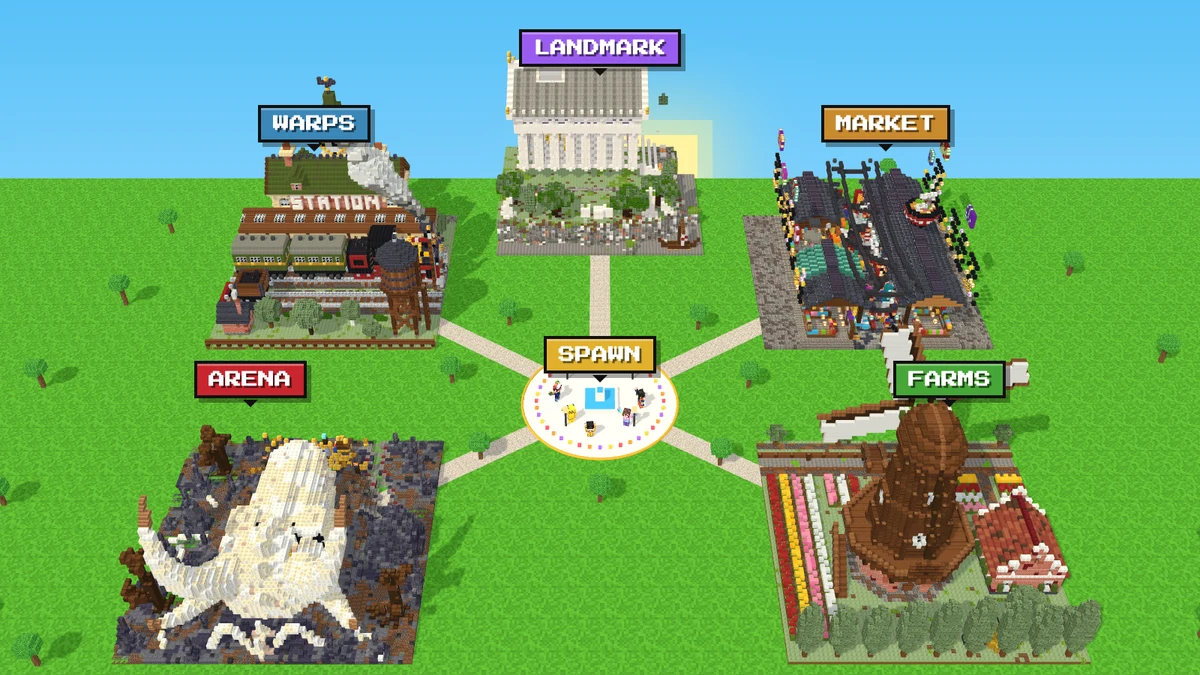
The picture above shows the layout most servers settle on: a plaza where players land, with paths out to every area. Here is where each zone usually goes:
| Zone | Where it goes | Why |
|---|---|---|
| Spawn plaza | Dead centre | Every new player lands here, so it needs signs and nothing to fall off |
| Warp hub | Next to spawn | The first thing players look for after joining |
| Market | A short walk away | Busy, but not in the way of new players |
| Arena | 150+ blocks out, or its own world | Keeps fights and lag away from spawn |
| Landmark | In sight of spawn | Gives the server a skyline for screenshots and trailers |
Keep it within reach of the server’s view-distance in server.properties. The default is 10 chunks, about 160 blocks. Anything further away will not show from spawn, so your landmark should sit closer than that.
Where Server Builds Come From
There are four ways to get builds onto a server. Most owners end up mixing the last two.
| Option | Time | Cost | Only on your server? | Watch out for |
|---|---|---|---|---|
| Build it yourself | Weeks | Free | Yes | Burning out before launch |
| Hire a build team | Days to weeks | Expensive | Yes | Contracts and revision rounds |
| Download schematics | Minutes | Often free | No | Credit rules and Minecraft version |
| Generate with AI | Minutes | 10 to 28 credits | Yes | Check it in 3D before you paste |
Download the pieces every server has, like a market or an arena. Generate the pieces that make your server recognisable, like the spawn itself.
Free Minecraft Server Builds to Download
These six from the free build library each fill one zone of a typical server. Open any of them to walk around inside in 3D before you download.
| Server zone | Build | Footprint | Blocks | Paste with |
|---|---|---|---|---|
| Network spawn | Floating Sky Island | 256 × 256 | 241,049 | FAWE |
| Warp hub | Old Steam Train Station | 64 × 64 | 23,448 | WorldEdit or FAWE |
| Market | Ramen Night Market | 64 × 64 | 45,749 | WorldEdit or FAWE |
| PvP arena | Colosseum Ruins | 256 × 256 | 657,500 | FAWE |
| Boss room | Dragon Skull Lair | 64 × 64 | 35,663 | WorldEdit or FAWE |
| Seasonal event | Haunted Carnival | 64 × 64 | 21,464 | WorldEdit or FAWE |
The two 256 × 256 builds are a zone on their own. On a small server, give the Colosseum its own world and keep the spawn to a 64-block build.
Generate Your Server’s Signature Builds With AI
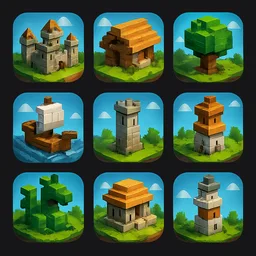
A downloaded spawn is fine, but the same spawn may already be on another server. The build players remember should be yours alone, so set it to Private before you generate, and it stays out of the public library. Describe it to the AI Minecraft build generator and walk through the result in minutes. What to ask for depends on the kind of server:
| Server type | Signature build | Prompt that works |
|---|---|---|
| Survival / SMP | A town square spawn | “Village square with a clock tower, a well and four shop stalls” |
| Minigame network | A lobby with a portal per game | “Floating lobby island with five glowing portals in a ring” |
| Medieval roleplay | A capital city gate | “Stone city gate with two towers, banners and a drawbridge” |
| Skyblock | A starter island hub | “Small floating island with a tree, a chest and a waterfall” |
| Factions / PvP | A neutral warzone | “Ruined fortress arena with broken walls and lava moats” |
- Choose the size by job. Builds come in 32, 64 or 256 blocks per side. A shop or a warp pad is 32 or 64. A full spawn is 256.
- Start from a picture. A screenshot of a spawn you like, a concept sketch or a photo of a real building all work with image to Minecraft build.
- Fix it before you download. Walk inside and ask for changes in words, like “wider paths” or “more light around the portals”.
Wondering how well AI builds hold up up close? See Can AI Build in Minecraft in High Quality?
How to Paste Schematics Into a Java Server
Use FastAsyncWorldEdit (FAWE). It takes the same commands as WorldEdit, but it places blocks in the background instead of all at once. A 600,000-block arena pasted with plain WorldEdit can freeze a server. With FAWE players barely notice.
- Add FastAsyncWorldEdit to the
pluginsfolder and restart the server. - Download each build as a
.schemfile. - Upload all of them to
plugins/FastAsyncWorldEdit/schematicsthrough your host’s file manager or FTP. - Join as an operator, stand where the first build should go and run the commands below.
//schem listshows every file you uploaded.//schem load floating-sky-islandloads one by its file name.//rotate 90turns it, if it faces the wrong way.//paste -a -splaces it where you stand.
-a skips air, so the build does not carve a box out of the land around it. -s selects what you pasted, so you can nudge it with //move 5 north or take it back with //undo. Repeat load and paste for each build. With the files uploaded, a whole spawn goes in within minutes.
Where a build lands depends on the point it was saved from. Paste the first one in an empty corner, see where it ends up, //undo, then paste it for real.
Paste Builds Without Plugins
- Fabric or Forge server: install the WorldEdit mod on the server. The commands are the same as above, and the files go in its
config/worldedit/schematicsfolder. - Plain vanilla server: there is no paste command. Build the spawn in a singleplayer copy of your world with the WorldEdit mod, then upload that world folder to the server.
- Survival servers that ban pasting: download the
.litematic. Litematica shows a see-through copy of the build, so the team can place every block by hand.
Add Builds to a Minecraft Bedrock Server or Realm
Bedrock needs no plugins. Download each build as a .mcpack. Each pack holds one build under its own name, so a dozen can sit in the same world.
- Open every
.mcpackon your PC. Minecraft imports them. - Edit a copy of your server world: turn on each build’s pack under Behavior Packs and turn on Cheats.
- Put the world back: on a Realm, use Replace World in the Realm settings. On Bedrock Dedicated Server, copy the world folder into
worlds/, and copy each build’s pack folder from Minecraft’scom.mojang/behavior_packsinto the server’sbehavior_packs/. - As an operator, stand where a build should go and run the command shown on the build’s download screen:
/structure load photo2skin:<build-name> ~ ~ ~
When a Paste Goes Wrong
| Problem | Likely cause | Fix |
|---|---|---|
| “Unknown command” | The plugin did not load, or you are not an operator | Check /plugins, then /op yourself from the console |
| Build lands in the wrong spot | The schematic’s saved origin | //undo, or use -s and //move |
| Server freezes during the paste | A huge paste with plain WorldEdit | Switch to FAWE and paste when few players are online |
| Blocks missing or swapped | The build uses blocks newer than your server | Update the server to the latest Minecraft version |
| Bedrock: structure not found | The pack is not active in that world | Turn the behavior pack on, then reload the world |
| Build cut off at one side | The world border or unloaded chunks | Widen the border with /worldborder and stand closer |
After the Paste: Turn It Into a Real Spawn
- Set where players land: stand on the plaza and run
/setworldspawn. - Protect it:
spawn-protectioninserver.propertiesonly covers 16 blocks around spawn. For the whole hub, make a WorldGuard region and deny building and PvP in it. - Add warps: with EssentialsX,
/setwarp marketat each zone, then put signs or NPCs at spawn that run/warp. - Light it up: since 1.18, monsters only spawn at block light level 0. A torch or lantern in every dark corner keeps spawn safe at night.
- Back up: save a copy of the world now. It is your restore point after griefing or a bad update.
Need the World Itself?
If your server is set somewhere real, generate the land too, then paste the hub on top. See how to convert Google Maps into a Minecraft world, or walk around New York in Minecraft.

Frequently Asked Questions
How big should a Minecraft server spawn be?
For a small or medium server, 100 to 200 blocks across is plenty. A big network can use a full 256-block spawn island. Keep everything you want players to see from spawn within the server’s view distance, which is 10 chunks (about 160 blocks) by default.
What is the best plugin to paste schematics on a server?
FastAsyncWorldEdit for Paper, Spigot and Purpur. It uses the same commands as WorldEdit but places big builds in the background, so the server does not freeze.
Can I paste builds on a hosted server?
Yes, if your host lets you add plugins. Install FastAsyncWorldEdit from the host’s plugin list or upload it, then upload your .schem files to its schematics folder with the file manager.
How do I add builds to a Bedrock Realm?
Turn on each build’s behavior pack in a copy of the Realm’s world, upload it with Replace World, then place each build with /structure load.
Do schematics work across Minecraft versions?
A schematic made for a newer version can lose blocks on an older server, because those blocks do not exist there yet. Run the latest version to be safe.
Can AI make a custom spawn for my server?
Yes. Describe the spawn or upload a picture in the Photo2Skin AI build generator, walk through it in 3D, change it with words, then download it as .schem for Java or .mcpack for Bedrock.