

Top 5 Minecraft Skin Editors in 2026
Search for a Minecraft skin editor and you get a wall of results, most of them written by people who never opened the tools. So we opened all five of these in a browser and clicked through them ourselves. Everything in the comparison table below is a feature we could actually verify — not a spec sheet copied from somewhere.
One thing up front: Photo2Skin is our editor. We've put it first because it does something none of the others do, and we'll show you exactly what that is. But we're not going to pretend the others don't work — they're capable, they're free, and there are a couple of things they do that we don't. That's in the table too.
The short version
- Photo2Skin editor — the only one that generates a skin from a photo or a text prompt, paired with an easy 3D/2D editor to finish it. Handles 128×128 HD as well as standard 64×64.
- Nova Skin — free, browser-based. Paints on the 3D model, with mirror, layers and a large texture library.
- PMCSkin3D — a 3D editor attached to a large skin community, with a one-click apply for Java.
- The Skindex — a big library and a simple 2D editor.
- Blockbench — not really a skin tool. A general 3D model editor that also does skins.
How the five compare
Checked by hand in July 2026. A dash means we couldn't confirm the feature exists — not that it definitely doesn't.
| Feature | Photo2Skin | Nova Skin | PMCSkin3D | The Skindex | Blockbench |
|---|---|---|---|---|---|
| Skin from a photo (AI) | Yes | — | — | — | — |
| Skin from a text prompt (AI) | Yes | — | — | — | — |
| Paint directly on the 3D model | Yes | Yes | Yes | — (2D grid) | Yes |
| 2D pixel grid | Yes | Yes | Yes | Yes | Yes |
| Mirror / symmetry painting | Yes | Yes | Yes (3 modes) | Yes | Yes (X axis) |
| Layers | Yes | Yes | — | Body / overlay | Yes |
| Native iPhone / iPad app | Yes | — | — | — | — (web app) |
| Exports a 64×64 PNG | Yes | Yes | Yes | Yes | Yes |
| Classic & Slim models | Yes | Yes | Yes | Yes | Yes |
| Price | Free to edit; AI uses credits | Free | Free | Free, ad-supported | Free, open source |
Look down the table and you'll notice something. Below the first two rows, these tools are broadly similar — everyone has a colour picker, everyone has mirror, most of them let you paint in 3D, and all of them spit out the same 64×64 PNG. The editors have converged. The interesting question isn't which one has more buttons.
It's what you do about the blank grid.
1. Photo2Skin — AI generation plus a full editor
Every other editor on this list starts you at an empty 64×64 canvas and wishes you luck. That's fine if you're a pixel artist. Most people aren't, and a blank grid is where most skin ideas quietly die.
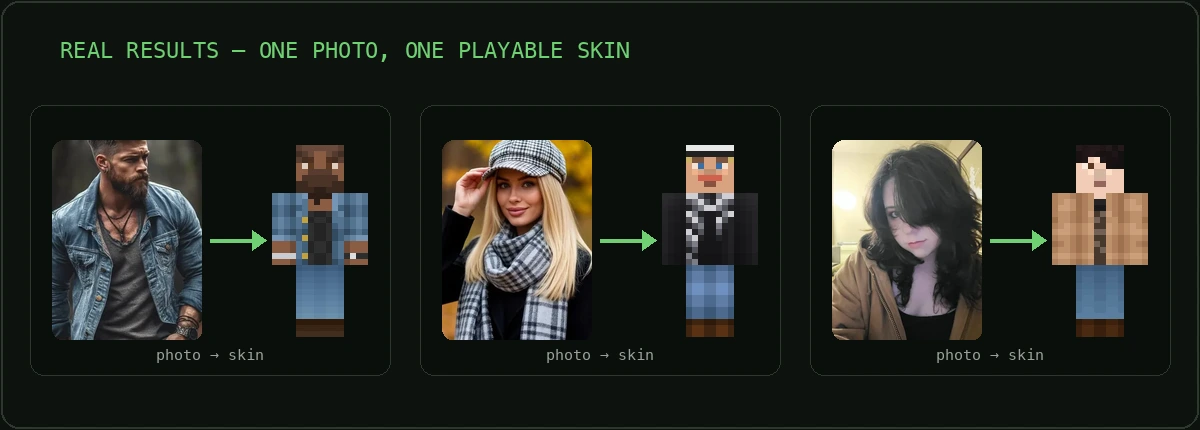
Photo2Skin starts somewhere else: it generates the skin for you, then hands you a real editor to finish it. Feed it a photo and an AI vision pipeline redraws it as a genuine skin — hair, colours, the clothes that were actually in the picture. Or type a text prompt — "cyberpunk samurai with a neon visor" — and it builds the character from your words. Either way you get three variants, and what comes out is a real 64×64 PNG, not a picture of a Minecraft character. Upload it to Java or import it into Bedrock straight away.
That's the part no other editor on this list does at all. But a generator on its own would just be a novelty — the reason it's usable is what happens next.
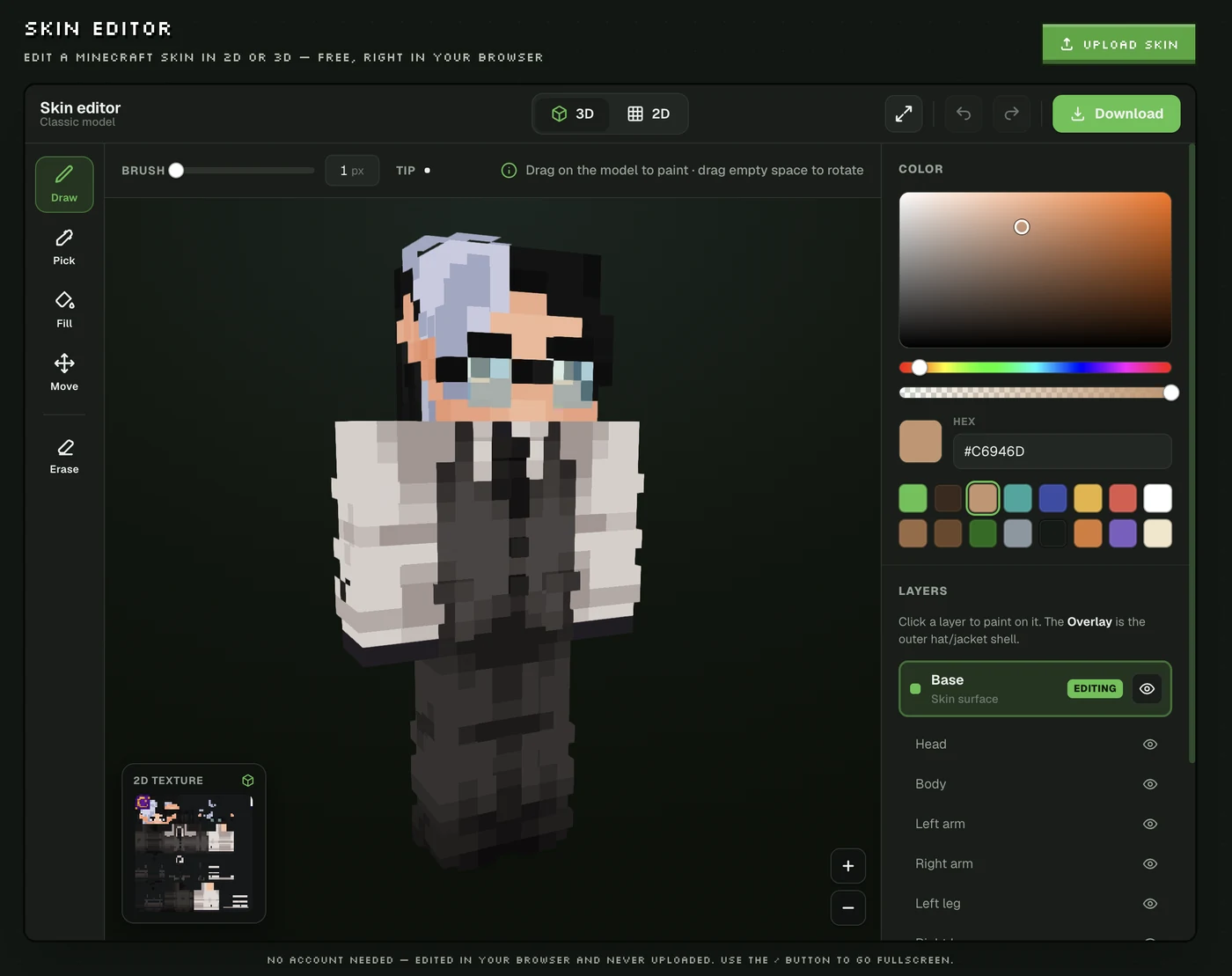
The editor is the other half, and it's built to be easy rather than deep. Paint straight onto the rotating 3D model — drag the character to paint, drag empty space to spin it — or flip to the 2D pixel grid with one button and work the flat texture like a classic editor. The two stay in sync, with a live mini-preview of whichever mode you're not in, so you never lose track of the result. Draw, fill, colour-pick, erase and move, adjustable brush size, a full colour picker, mirror painting for symmetric detail, and layers — base plus the outer hat/jacket shell — with per-part visibility so you can hide an arm to get at what's underneath. Classic (4px arms) and Slim (3px) both supported — and the canvas isn't capped at 64×64: it handles 128×128 HD skins too, for when you want detail the standard grid can't hold.
The point of the pairing is that the AI gets you to roughly 90% in a couple of minutes, and the editor is there for the last 10% — change a colour, fix a detail, add a logo — instead of asking you to draw all of it or none of it.
Where it's genuinely better: nothing else here turns a photo or a sentence into a skin file, and then lets you edit the result on the model in the same place.
Where it isn't: the library editors have millions of community skins to remix and we don't have a gallery like that. And AI generation costs credits, where Nova Skin, PMCSkin3D and Blockbench are free forever.
Open the editor · More about the editor · How the photo-to-skin pipeline works
2. Nova Skin — free and browser-based
Open Nova Skin and you're painting on a 3D Steve standing in a Minecraft landscape. The toolbar has mirror, layers, slim arms, a shading tool, copy/paste and a set of brushes. Its search bar advertises 70M+ skins and textures to pull from.
It's free and it's been around a long time. If you want to draw your own skin in a browser, it covers the ground.
What it has that we don't: mirror on the web, a large texture library, and no cost.
The catch: it's a drawing tool. It'll help you make a skin; it won't make one of you.
3. PMCSkin3D — a large community library
Planet Minecraft's editor sits inside a big community — the skins section listed 2,212,881 skins the day we checked. The editor paints directly on 3D models, and it has three mirroring modes: surface mirroring across the X axis, the Y axis, and mirroring across limbs so you can paint both arms at once.
On the publishing side, skin pages carry an Apply to Java button that uploads a skin to your minecraft.net account for you — no downloading, no file managing. (Bedrock is still a manual import, per PMC's own FAQ, and the apply button lives on published skin pages rather than inside the editor.)
What it has that we don't: the community library, the mirroring modes, the Java apply flow, and no cost.
4. The Skindex — a big skin library
The Skindex is the name most people hit first, and it's built around its community skin library. Its editor is simple: a 2D pixel grid with pencil, eraser, bucket, colour picker, auto-tone, darken/lighten, a mirror toggle, and body/overlay visibility. Classic and Slim both supported, download straight to your computer.
It's the fastest way to grab an existing skin and tweak it. It's ad-supported, so expect ads around the editor.
What it has that we don't: a large library to start from, and no cost.
The trade-off: the editor is a flat grid — no painting on the 3D model — so you're working in UV space and imagining how it wraps.
5. Blockbench — a general 3D model editor
Blockbench isn't really a skin editor; it's a free, open-source (GPL-3.0) low-poly model editor that happens to ship a Minecraft Skin format targeting both Java and Bedrock. You paint directly on the model in 3D, it has layers with blend modes, mirror painting across the X axis, UV control, bones and animation, and a plugin ecosystem. It runs on Windows, macOS and Linux, plus a web version.
Microsoft's official Minecraft Creator documentation covers Blockbench as a tool for making models — while noting it's third-party and not a Mojang or Microsoft offering.
For a 64×64 player skin it's overkill — it's aimed at custom entities, blocks and animated models rather than at making a skin quickly.
Note for phone users: there's no App Store or Play Store app — on mobile it installs as a progressive web app from the browser.
How to choose
| If you want to… | Use |
|---|---|
| Generate a skin from a photo instead of drawing it | Photo2Skin |
| Turn an idea into a character from a sentence | Photo2Skin |
| Generate a skin, then actually edit it in 3D | Photo2Skin |
| Draw your own skin, free, with every tool | Nova Skin |
| Remix a community skin and apply it to Java fast | PMCSkin3D |
| Browse a large library and make quick edits | The Skindex |
| Model custom entities, blocks or animations | Blockbench |
| Edit on an iPhone or iPad in a real app | Photo2Skin |
One thing to check before you trust any skin tool
A real Minecraft skin is a 64×64 PNG with transparency, UV-mapped so each patch of the image lands on a specific face of the player model. Every editor in this comparison produces one. But a lot of tools that show up in the same search results are general image generators wearing a Minecraft costume — they hand you a nice picture of a blocky character, which the game will not accept as a skin.
64×64 is the number to know, with one wrinkle: Bedrock also takes HD skins at 128×128, delivered as a skin pack, and Photo2Skin's editor works at that size too. Java stays at 64×64. So if you play Java, 64×64 is the answer; if you're on Bedrock and want finer detail, HD is on the table.
The checklist is short. Does it say 64×64 (or 128×128 for HD)? Does it give you a PNG, not a JPG? Does it tell you how to upload the file to Java or import it into Bedrock? If a tool skips all three, it's an art generator, not a skin maker. We wrote about that distinction in making a Minecraft skin with AI.
Frequently asked questions
What is the best Minecraft skin editor?
It depends what you're doing. Want the skin generated for you? Photo2Skin is the only one here that turns a photo or a prompt into a real skin, then gives you a 3D and 2D editor to finish it. Want a free editor and a large library to remix? Nova Skin and The Skindex both cover that. Want community and one-click Java apply? PMCSkin3D. Modelling entities and animations rather than skins? Blockbench.
Are Minecraft skin editors free?
Nova Skin, The Skindex, PMCSkin3D and Blockbench are all free. The Skindex is ad-supported; Blockbench is open source under GPL-3.0. Photo2Skin's editor is free to open and paint in — credits are only for AI generation from a photo or prompt.
Which editors let you paint directly on the 3D model?
Photo2Skin, Nova Skin, PMCSkin3D and Blockbench all do — you drag on the rotating character instead of guessing how a pixel wraps. The Skindex editor is a 2D grid.
Can any skin editor make a skin from a photo?
Of these five, only Photo2Skin. The others are drawing tools: you paint the skin, or you start from one somebody else uploaded.
Do these work with both Java and Bedrock?
Yes — all five export the standard 64×64 PNG both editions accept, with Classic and Slim models. The difference is delivery: PMCSkin3D can apply a published skin to your Java account automatically, Photo2Skin's iOS app sends a skin into Bedrock as a skin pack, and otherwise you upload the PNG yourself.
Is there a Minecraft skin editor app for iPhone?
Photo2Skin has a native iOS app for iPhone and iPad, with a one-tap Apply into Bedrock. Nova Skin, The Skindex and PMCSkin3D run in a mobile browser; Blockbench installs as a progressive web app rather than from the App Store. For a phone-first comparison, see the best Minecraft skin editor apps for mobile.
Can I make a 128×128 HD Minecraft skin?
In Photo2Skin, yes — the editor works at 128×128 as well as the standard 64×64, so you can push detail further than the normal grid allows. Worth knowing which edition you're on first: HD skins are a Bedrock feature (they go in as a skin pack), while Java sticks to 64×64. If you play Java, make a 64×64.
What size is a Minecraft skin file?
64×64 pixels, PNG, with transparency — that's the standard, and it's what both editions accept. Bedrock additionally supports HD skins at 128×128. What it's never is a JPG, or some arbitrary image size.
Try it yourself
If you've read this far, you probably already know which one you want. If it's "generate me a skin, then let me actually edit it" — that's the one thing on this list with only one answer.
Open the Photo2Skin editor — free to try, works in any browser, and there's an iPhone and iPad app if you'd rather make your skin on the device you play on.